Valnow
Valnow Evaluation · New

Lender-ready evaluation reports, drafted for your valuer

Valnow gathers the data, writes the report and runs the numbers. Your valuer answers the few questions it cannot, applies judgment, concludes on value and signs.

Start an evaluation
How an evaluation comes together

From address to signed report

Start from the property

Enter the address and, optionally, the parcel number and the operating statement. Valnow collects the model value, market trends, cap rates, comparables, flood zone and, in supported counties, the county record.

Answer what is missing

The report opens right away. An assistant asks only the questions it cannot answer from data, and each answer fills the matching yellow field in the report.

Conclude and sign

Adjust the approaches and their weights, set your concluded value, and sign once every section is complete. The signed report is locked.

Subject and inspection

The property, documented

Inspection photos with captions, maps, satellite and Street View are placed for you. In supported counties, the parcel lookup by APN or address fills the legal description, building data and recorded sales.

  • Yellow fields show exactly what is left to answer
  • FEMA flood zone added automatically
  • Owner names never displayed or sent to the AI
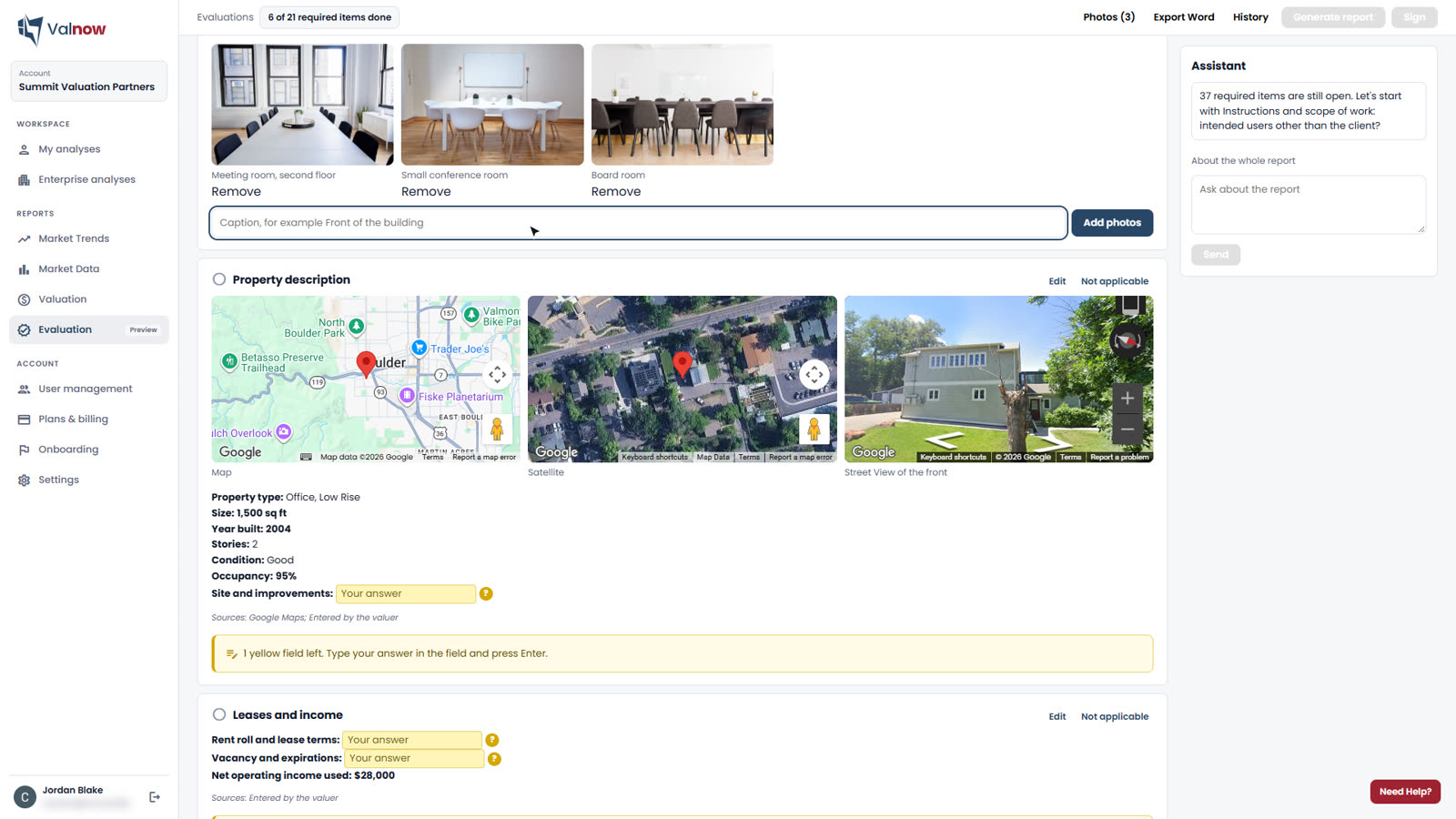
Evaluation workspace
Evaluation workspace with inspection photos and property description
Sales comparison

Comparables you can defend

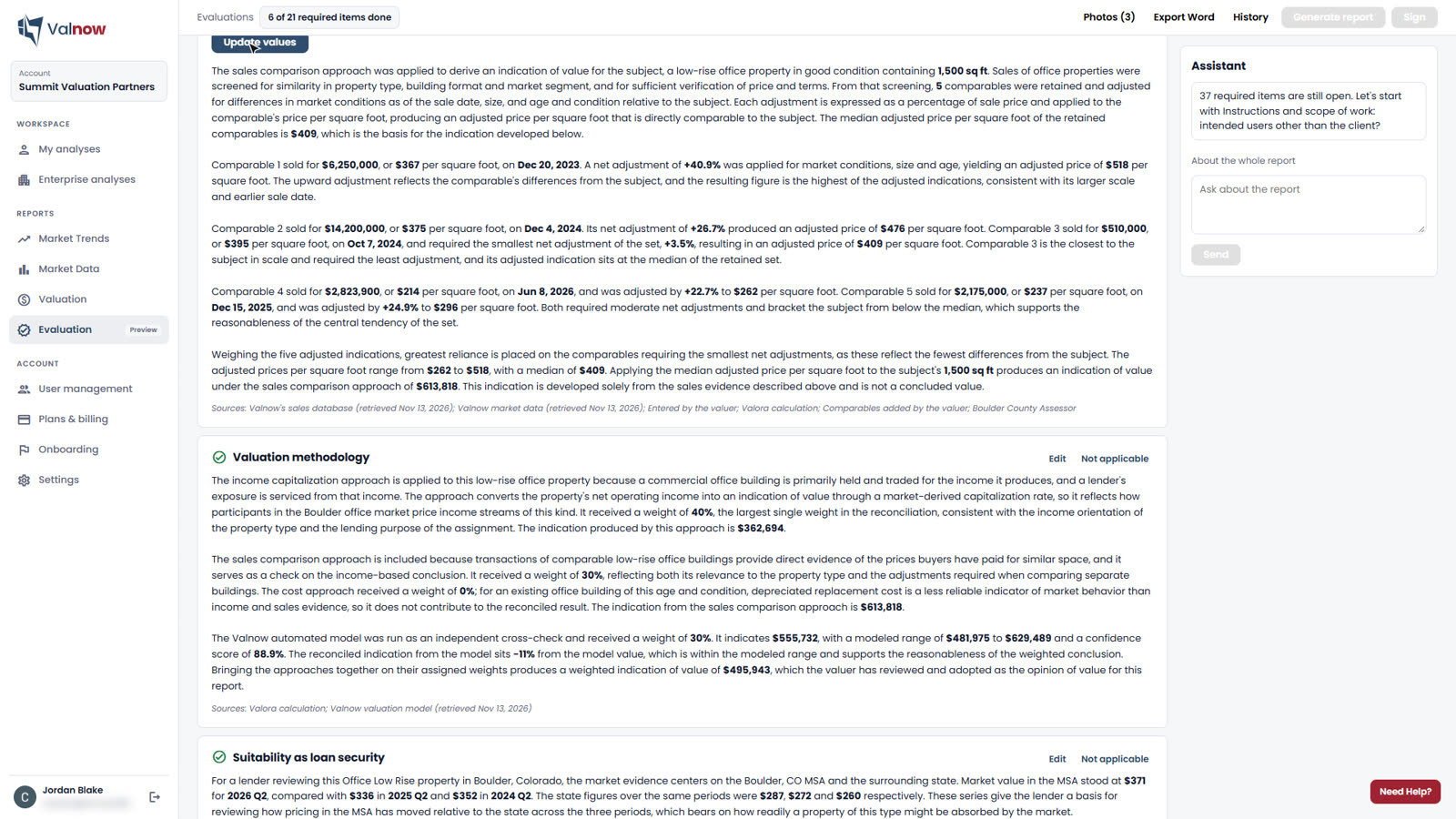
Start from Valnow's comparable sales and, where available, qualified public sales from the county. Add your own by hand or by CSV import. Each sale keeps its source, and every adjustment is written out.

  • Date, size and age differences computed for each sale
  • City, county, MSA and source shown for every comparable
Sales comparison
Sales comparison approach with comparable sales and adjustments
Income and cost

The numbers, laid out like a spreadsheet

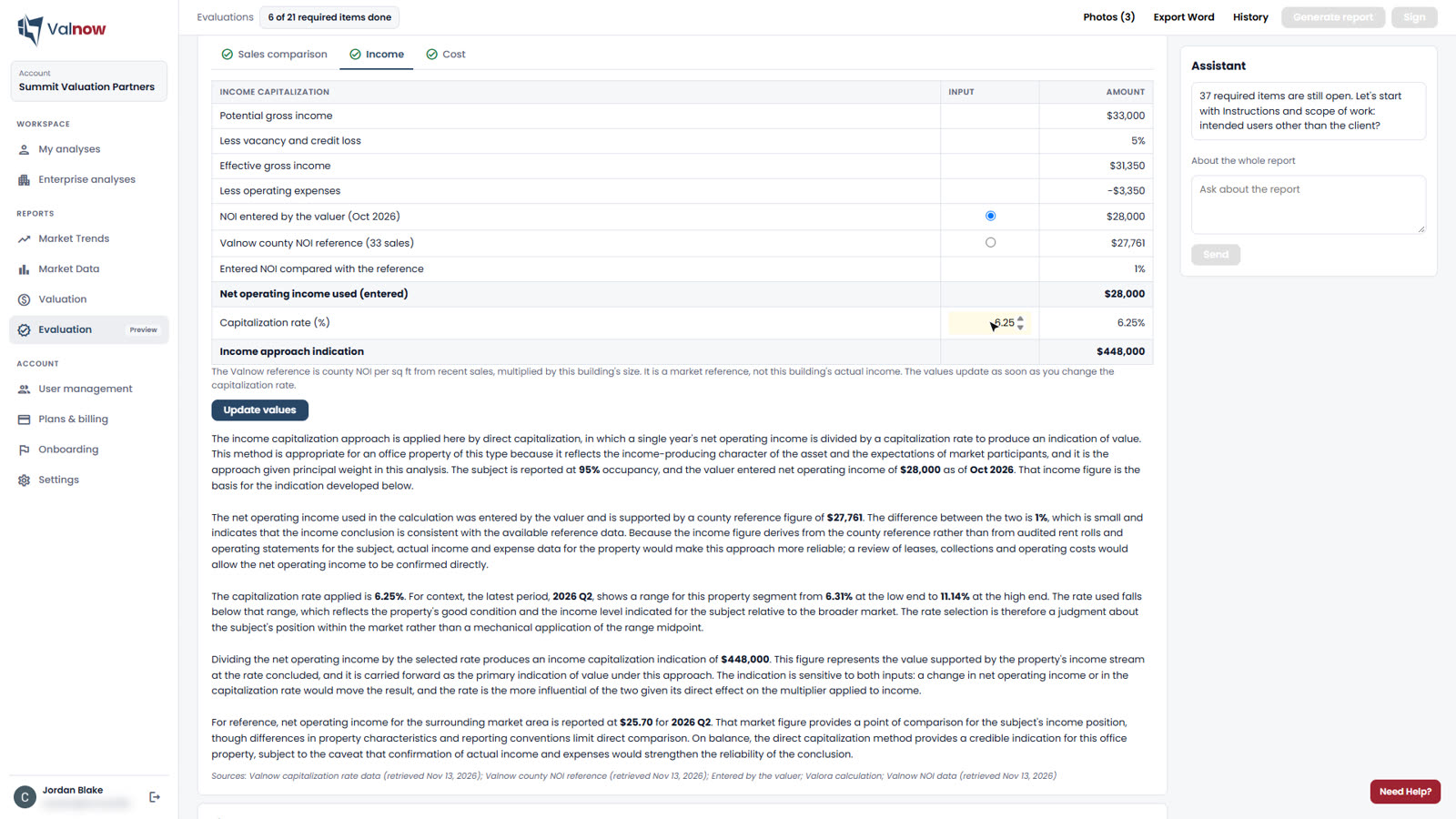
The income approach builds from potential gross income to NOI and capitalizes it with a market cap rate. Your NOI is shown next to the county's median NOI, and you choose which one to use. The cost approach is there when the property calls for it.

  • Every calculation is tested code, never the AI
  • Change a rate and the value updates at once
Income approach
Income capitalization approach in the evaluation workspace
Reconciliation

Your weights, your conclusion

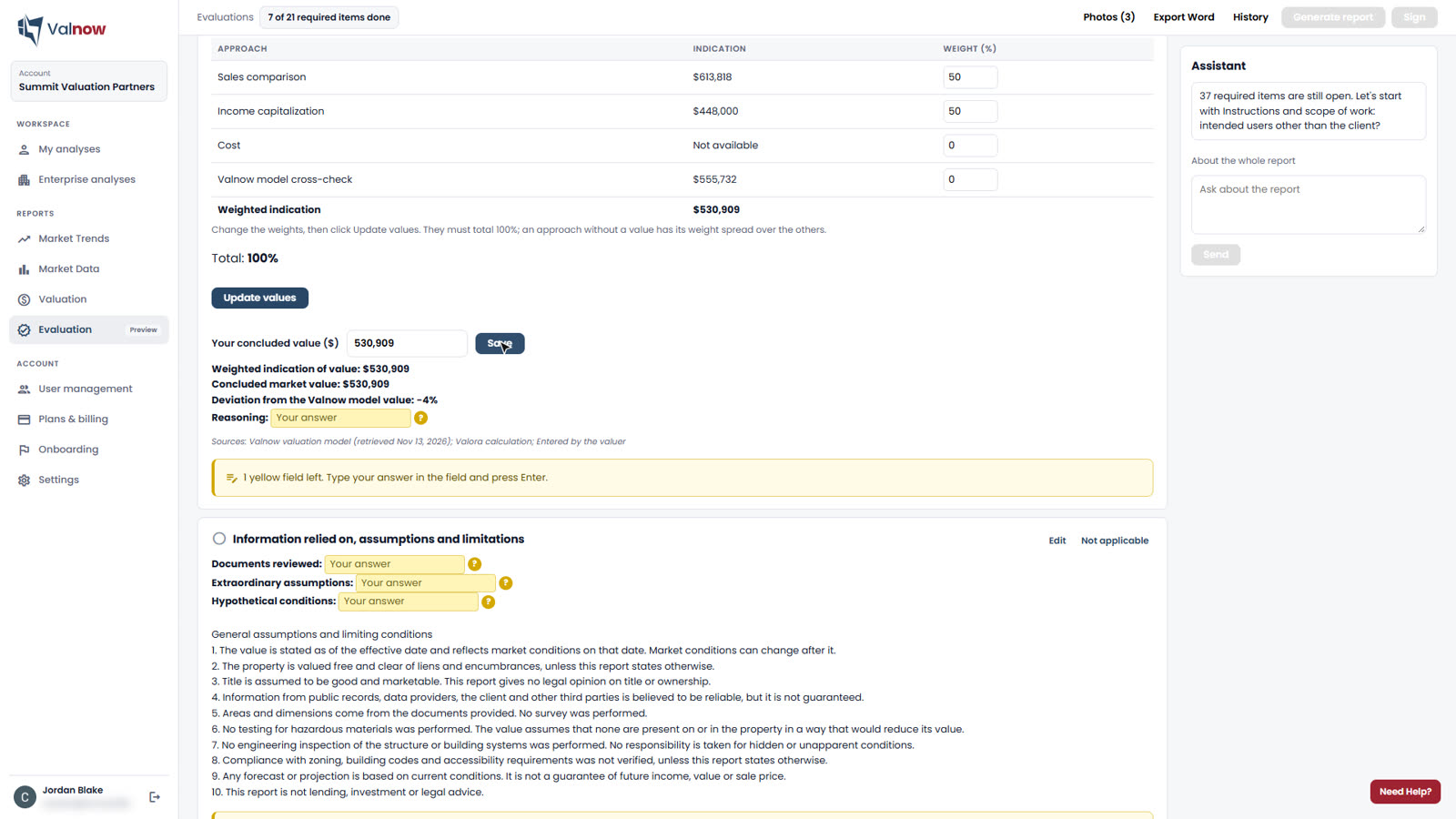
Weight the sales, income and cost approaches and the Valnow model, compare the deviation from the model, and set the concluded value. The valuer's conclusion is the one that counts.

  • Weights must total 100%, checked on screen and on the server
  • Model value shown as an independent cross-check
Reconciliation
Reconciliation of the approaches with weights and concluded value
Controls

An AI draft your reviewer can trust

Valnow writes quickly, but it is built so that the final report remains the valuer's work, and every statement can be traced.

Figures linked to sources

Each number in the text is linked to the data it comes from, with its date. Click any figure to see its source. The AI cannot add a number that is not in the file.

Checklist before signature

The report cannot be generated or signed until every section is complete or marked not applicable.

Locked once signed

A signed evaluation no longer changes, and every action is recorded with its author and date.

Names stay private

Client, borrower, address, valuer and owner names are replaced before any text is sent to the AI.

Standard language included

General assumptions, limiting conditions, restrictions of use and certification are pre-filled for you to complete.

Your sources listed

Valnow's data sources and the sites your team uses for comparables, zoning and costs appear in the report.

Your report, your brand

A finished PDF in your firm's colors

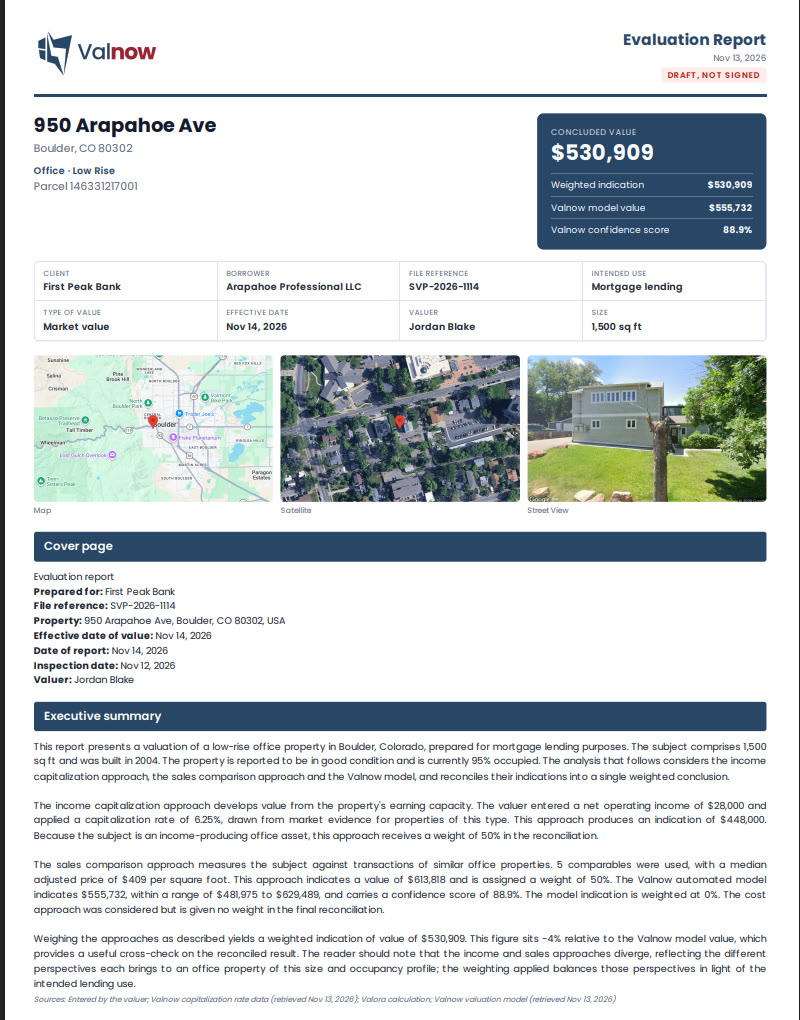
Set your logo, color, disclaimer and footer once. Every evaluation comes out as a print-ready PDF in your branding, or as a Word file, with the value box, maps, approaches, charts and photos.

  • Colleagues on the same account can open your evaluations
  • Only the author edits, deletes or signs
  • Evaluations appear in My analyses and Enterprise analyses
First page of a Valnow Evaluation PDF report
FAQ

Evaluation questions

What is an evaluation in commercial real estate lending?

An evaluation is an estimate of market value that federally regulated lenders may use instead of an appraisal for certain transactions, such as commercial real estate loans of $500,000 or less. It must be supported, documented and prepared by someone competent and independent of the loan decision. Read our guide.

Who signs a Valnow Evaluation?

Your valuer. Valnow drafts the report and runs the calculations; a qualified person reviews it, concludes on value and signs. Valnow does not sign evaluations.

Does Valnow Evaluation follow the Interagency Guidelines?

The report is structured around the content the Interagency Appraisal and Evaluation Guidelines describe for an evaluation: location, description, value, inspection method, analysis, supporting data, sources, effective date and preparer. Your institution remains responsible for its evaluation program.

How is an evaluation paid for?

$599 per evaluation, paid when you start it, or included in the unlimited subscription from $499 a month. Credits for other report types cannot be used for an evaluation.

Can I use my own comparables?

Yes. Add sales by hand or import a CSV with address, sale date, sale price and size. Each sale keeps its source and is adjusted like Valnow's.

Which property types are supported?

Office, retail, industrial and multifamily properties across the United States.

Value your next property in minutes

Create your account and run your first valuation free, or book a demo with our team.